

Online Security: Protect Your Business Online
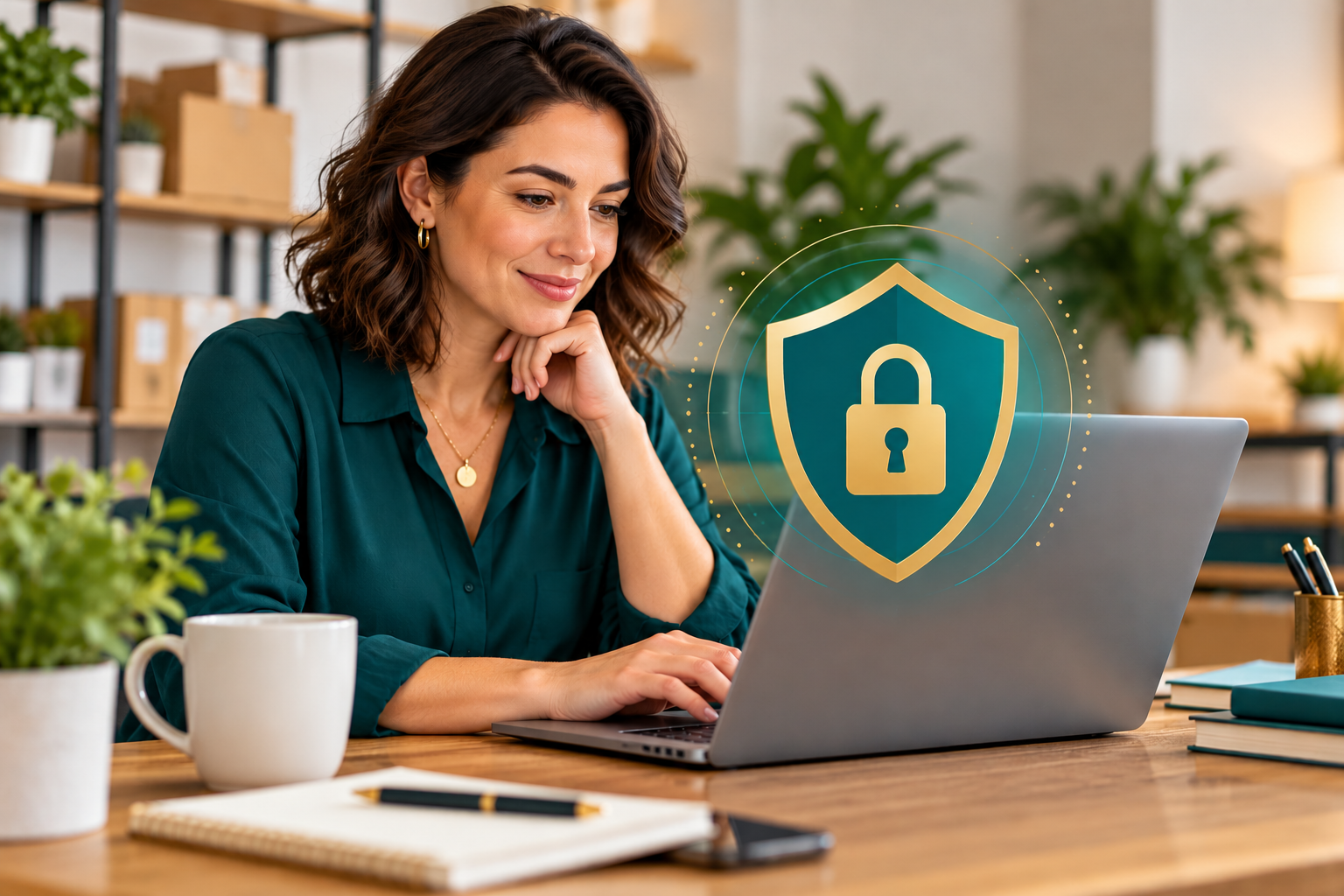
Picture this. It's Friday afternoon, and you're finally catching up on the week's bills. There's an invoice from a supplier you've worked with for years. Same logo, same layout, same friendly sign-off. You pay it, close the laptop and head home.
Two weeks later, that supplier calls asking why you haven't paid. The money is gone. It went to a scammer who quietly slipped new banking details into an otherwise perfect invoice.
This isn't a far-fetched story. It's one of the most common ways Canadian businesses lose money today. And it's exactly why so many business owners we talk to are nervous about taking their business online at all.
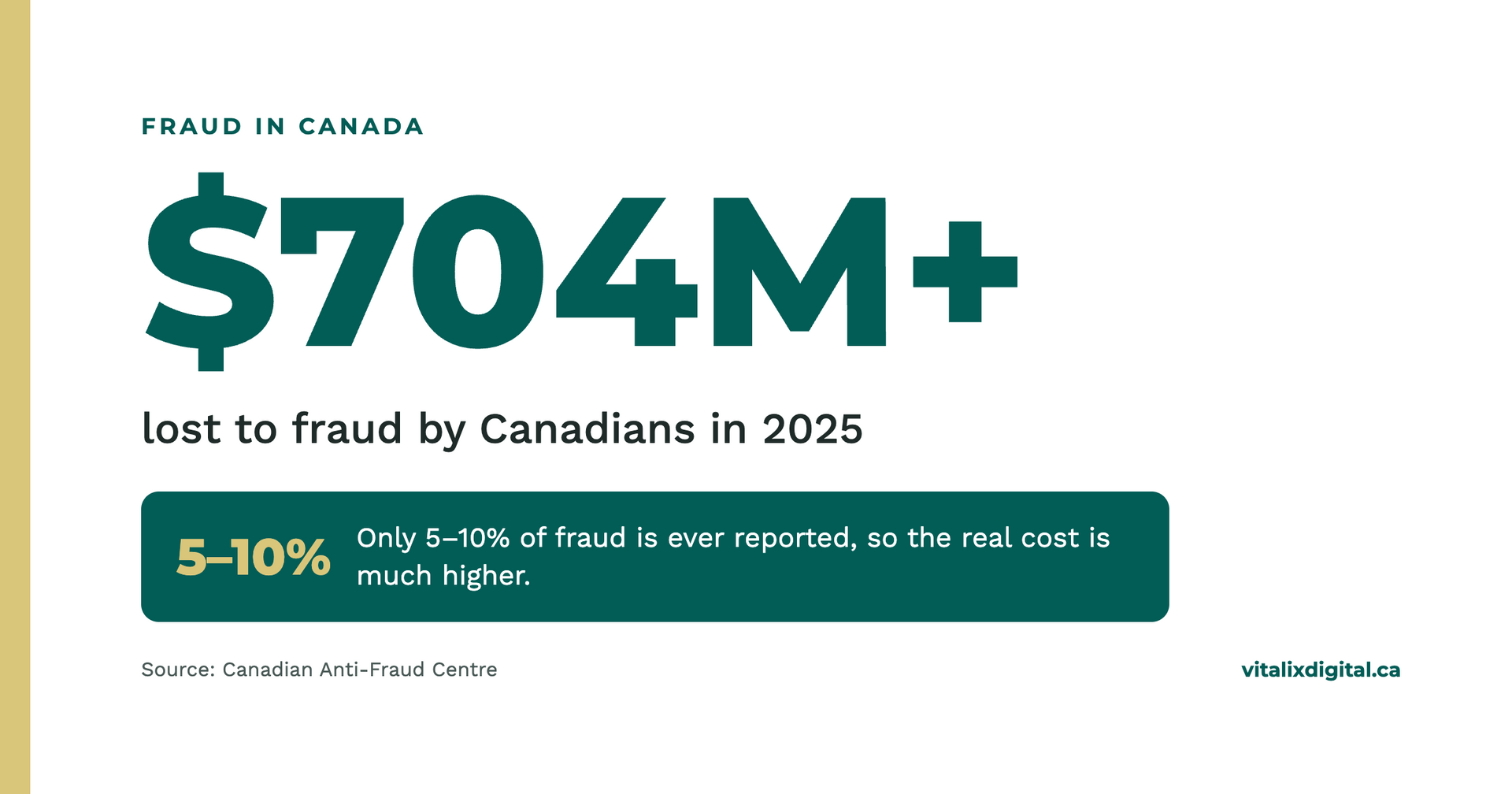
We hear it all the time: "I don't want a website because I'll get hacked," or "I'm scared to take payments online." That fear is completely understandable. Canadians reported over $704 million in fraud losses in 2025, and roughly $351 million more in just the first half of 2026, according to the Canadian Anti-Fraud Centre (CAFC). The Centre estimates only 5% to 10% of fraud is ever reported, so the real toll is far higher.
But staying offline isn't the answer. Your customers are searching for you online, and scammers will still find your email and phone number either way. The real answer is knowing what to watch for and having the right protections set up from the start. In this guide, we'll share real stories of what's happened to businesses like yours, the scams we see most often, the warning signs to watch for, and exactly what to do if something slips through.
The Real Cost: What's Happened to Businesses Like Yours
These aren't just statistics. Behind every number is a business owner who trusted the wrong email, and a team that felt the fallout.
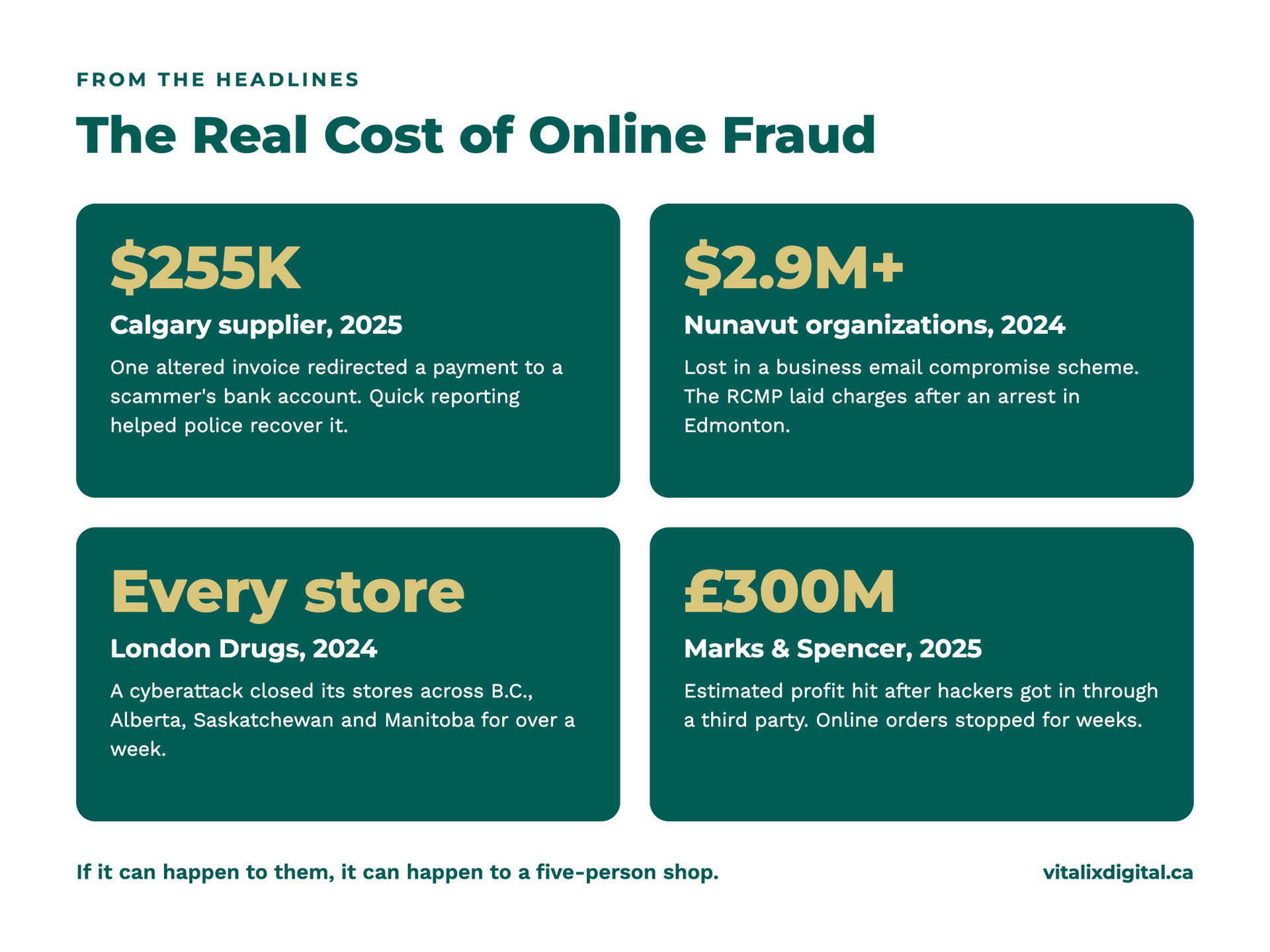
A Calgary supplier lost $255,000 to one altered invoice. In 2025, scammers got into the email of a Calgary oil field supply company and subtly changed the banking details on a legitimate invoice. More than $255,000 was redirected to a fraudulent account. Because the company reported it right away, Calgary police were later able to recover the money. Most businesses aren't that lucky.
Two Nunavut organizations lost nearly $3 million. In a business email compromise scheme in fall 2024, more than $2.9 million was taken from the Qikiqtaaluk Business Development Corporation and another $26,000 from the Nunavut Film Development Corporation. The RCMP laid fraud charges in 2025 after making an arrest right here in Edmonton.
London Drugs closed every store across Western Canada. In spring 2024, a cyberattack forced the retailer to shut its stores in B.C., Alberta, Saskatchewan and Manitoba for over a week. Prescription refill systems and phone lines went down, and customers were left scrambling.
Marks & Spencer took an estimated £300 million hit. In 2025, hackers got into the U.K. retailer's systems through a third party after what its CEO called human error. Online orders stopped for weeks, shelves went empty and customer data was stolen.
If it can happen to companies with entire security teams, it can happen to a five-person shop. The difference is that a big company can absorb the blow. For a small business, a single loss of a few thousand dollars can mean a missed payroll.
It's Not Just the Money
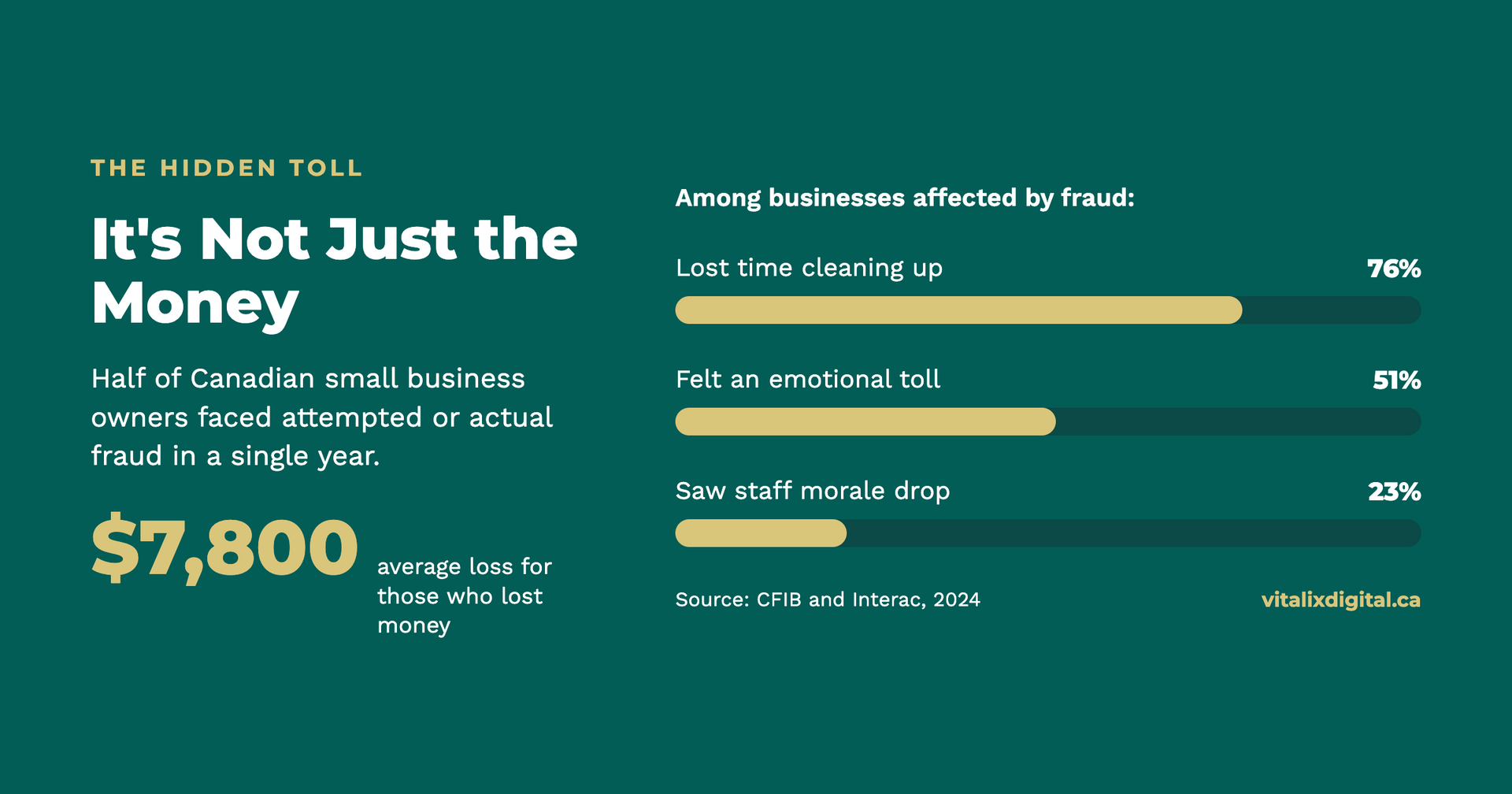
In a 2024 survey, the Canadian Federation of Independent Business (CFIB) found half of small business owners faced attempted or actual fraud in a single year, and those who lost money lost an average of $7,800. But the money was only part of the damage. Three in four lost time cleaning up the mess, about half said it took an emotional toll, and nearly a quarter saw staff morale drop.
That matches what we see. Fraud leaves owners second-guessing every email, embarrassed to tell their team or clients, and lying awake wondering what else might be exposed. It can chip away at the trust you've spent years building with customers (more on protecting that in our small business guide to reputation management). That's the part no insurance policy fully covers.
Common Scams Targeting Small Businesses
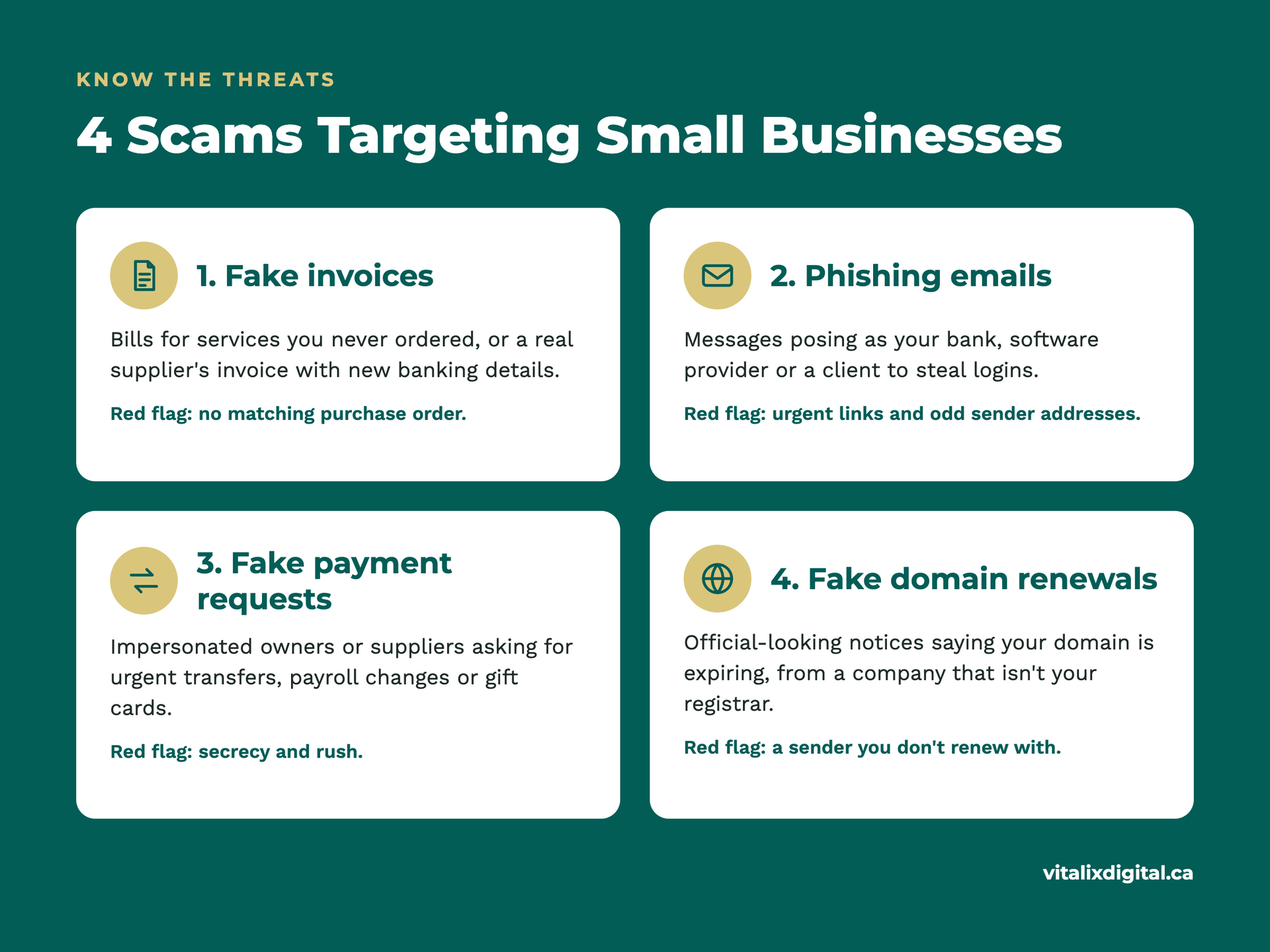
These four scams show up again and again in Canadian small business inboxes. Each one works by looking routine.
1. Fake invoices
A bill arrives for a service you may or may not use: office supplies, a directory listing, "advertising," or software support. The amount is usually small enough to slip through without a second look. Some fake invoices copy a real supplier's logo and layout, then swap in new banking details.
How it plays out: Your bookkeeper sees a $389 invoice from a familiar-sounding vendor and pays it with the rest of the month's bills.
2. Phishing emails
Phishing emails pretend to come from someone you trust: your bank, Canada Post, Microsoft, Google, the CRA or even a client. The goal is to get you to click a link, open an attachment, or type your password into a fake login page. Spear phishing is the targeted version, using your name, your business and details pulled from your website or LinkedIn.
How it plays out: "Your Microsoft 365 password expires today. Click here to keep your account active." The page looks real, but it's harvesting your login.
3. Fraudulent payment requests
Often called business email compromise (BEC), this scam impersonates the owner, a manager or a regular supplier. A message asks for an urgent wire transfer, a change to payroll deposit details, or a stack of gift cards "for a client." Sometimes the scammer has actually broken into a real email account, so the message comes from a genuine address.
How it plays out: "Hi, it's Monica. I'm in meetings all day. Can you send $4,800 to this new supplier account before 3 p.m.? I'll explain later."
4. Fake domain renewal notices
Your website's domain name is public information, and so is its renewal date in many cases. Scammers send official-looking notices warning that your domain is about to expire. Some are pure fraud that take payment for nothing. Others, sometimes called "domain slamming," trick you into transferring your domain to a different, overpriced company. CIRA, which runs the .ca registry, has warned .ca owners about both versions for years.
How it plays out: A letter or email titled "Domain Name Expiration Notice" asks you to pay $75 to keep yourbusiness.ca, even though you renew it elsewhere for $20.
Warning Signs to Look For Before You Click, Pay or Share
Scammers rely on speed. Pausing for 30 seconds to check these red flags will stop most attacks.
Before you click
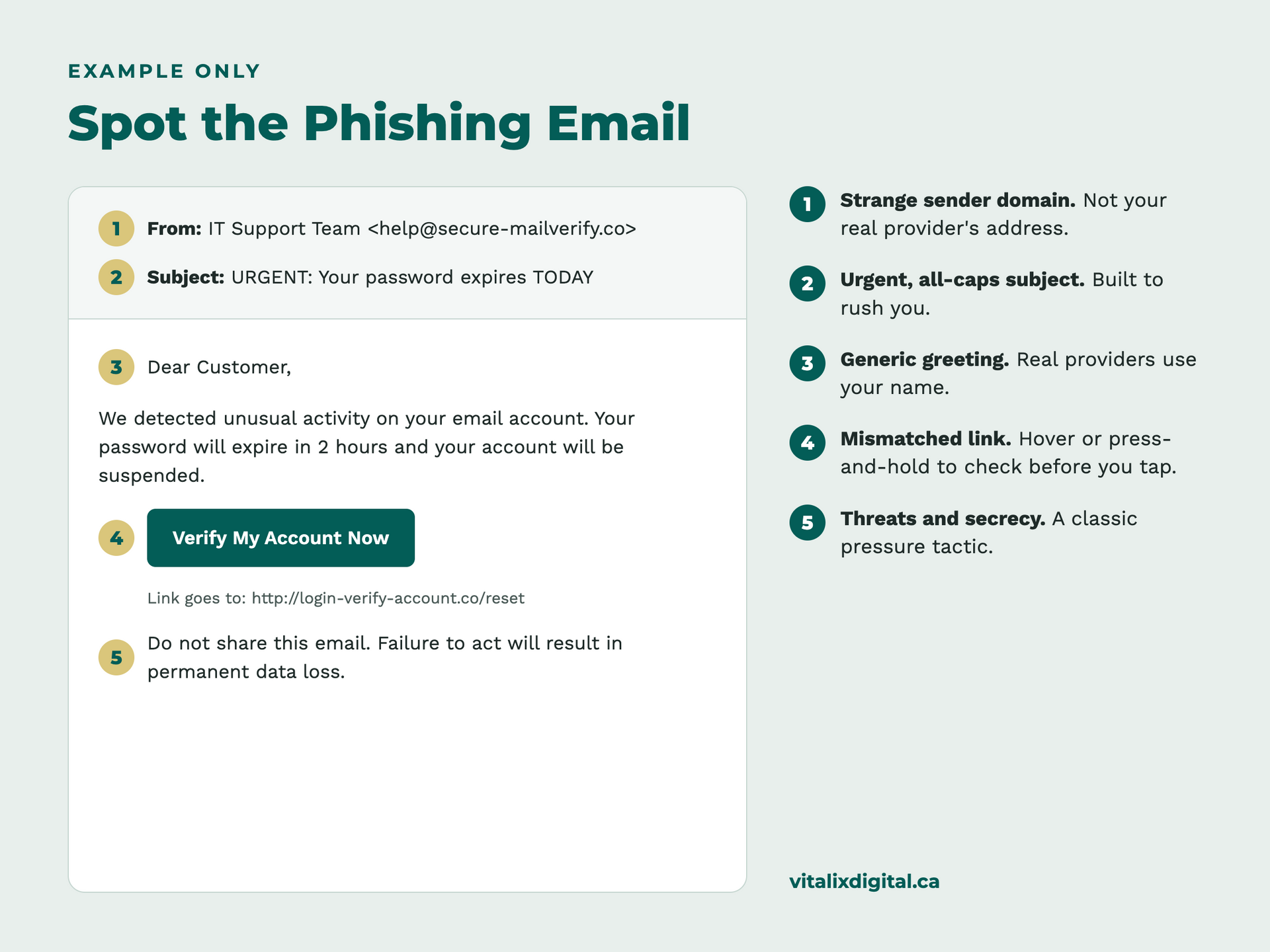
- The sender address is slightly off. Look for swapped letters or extra words, like accounts@vitalix-digital.co instead of your real contact's domain.
- The link doesn't match. On a computer, hover over the link to preview the real web address. On a phone, press and hold. If it doesn't go to the company's real website, don't tap it.
- Urgency or threats. "Act now," "account suspended," or "final notice" are designed to rush you past your common sense.
- Unexpected attachments. Invoices, "scanned documents" or shared files you weren't expecting, especially .zip, .html or macro-enabled files.
- Generic greetings. "Dear Customer" from a company that normally uses your name.
Before you pay
- New or changed banking details. This is the single biggest red flag. Always confirm by phone using a number you already have on file, never the one in the email.
- Unusual payment methods. Gift cards, cryptocurrency or wire transfers to personal accounts are almost never legitimate business requests.
- You can't match it to a purchase order or contract. If nobody on your team ordered it, don't pay it.
- Secrecy. "Keep this between us" or "don't call, I'm in a meeting" is how impersonators avoid being caught.
Before you share information
- Requests for passwords or verification codes. Legitimate companies, including your bank and CIRA, will not ask for your password or one-time code by email, text or phone.
- "Verify your account" forms. If you're asked to confirm login, banking or customer details, go to the website directly by typing the address yourself.
- Callers who contacted you first. If someone calls claiming to be your bank, IT provider or a government agency, hang up and call the official number back.
How to Protect your Business Website, Email, Social Media and Customer Information
Your Website and Domain
- Know who your registrar is. Write down where your domain is registered, when it renews and who has the login. Only pay renewal notices from that company.
- Turn on auto-renew and registrar lock. Auto-renew prevents an accidental lapse, and a transfer lock stops your domain from being moved without your approval.
- Keep your website software updated. Outdated WordPress plugins, themes and page builders are one of the most common ways small business sites get hacked.
- Use an SSL certificate (https). It protects visitors' data in transit and is expected by both Google and your customers.
- Back up your site regularly. Store backups somewhere separate from your hosting account so you can restore quickly after an attack.
- Limit admin access. Give each person their own login with only the permissions they need, and remove access when staff or contractors leave.
Your business email
- Turn on multi-factor authentication (MFA). This one step blocks the vast majority of account takeovers, even if a password is stolen.
- Use a password manager. Every account gets a long, unique password, and no one has to remember them.
- Set up email authentication (SPF, DKIM and DMARC). These settings make it much harder for scammers to send emails that look like they come from your domain. Your email provider or web team can set them up.
- Watch for sneaky forwarding rules. Hackers who get into an inbox often add a rule that quietly forwards your mail. Check your settings every few months.
Your social media accounts
- Turn on MFA for every platform (Facebook, Instagram, LinkedIn, Google Business Profile, TikTok). Your Google Business Profile is especially valuable, so see our tips on optimizing your Google Business Profile.
- Use a business manager tool, such as Meta Business Suite, so access is granted by role rather than by sharing one password.
- Be wary of "copyright violation" or "page will be disabled" messages. These are common phishing tactics aimed at business pages. Check alerts inside the app itself, not through links in messages.
- Keep at least two trusted admins so you're never locked out if one account is compromised.
Your customer information
- Collect only what you need, and delete what you no longer use.
- Store data in secure, access-controlled systems like your CRM, not in spreadsheets attached to emails.
- Never send sensitive information by email or text (credit card numbers, SIN numbers, health details).
- Train your team. A 15-minute refresher on scams at your next staff meeting is one of the best investments you can make, and as we share in your customer experience starts with your team, your people are your front line.
- Know your legal duties. In Alberta, most private businesses fall under the Personal Information Protection Act (PIPA), which requires you to report certain privacy breaches. Federally regulated businesses fall under PIPEDA. For a plain-language overview, read our guide to
navigating Canadian data privacy laws.
The "Free" Shortcuts that Leave Small Businesses Exposed
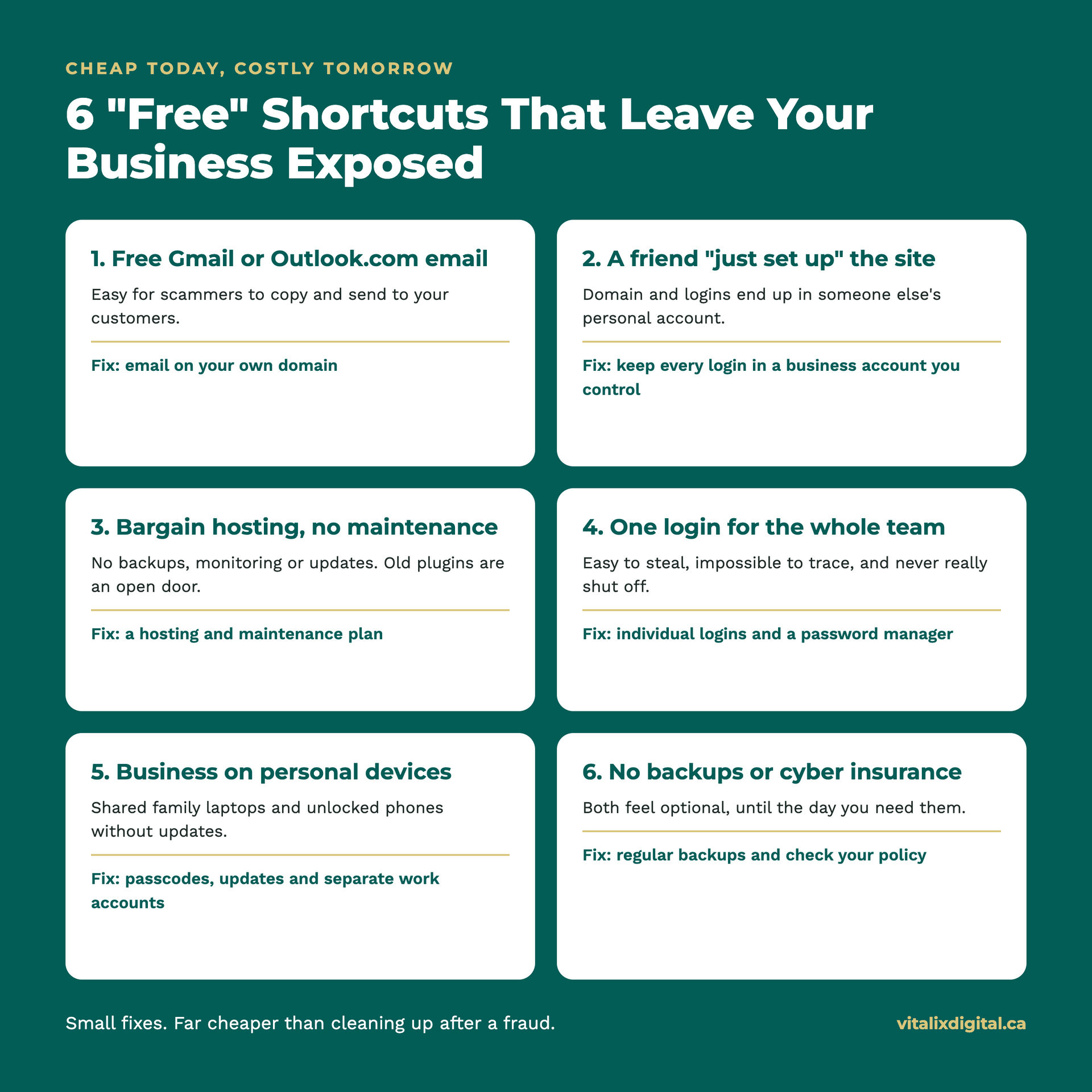
Running a small business means watching every dollar. We understand that. But some of the most common ways owners save money online are the same gaps scammers count on. Here are the shortcuts we see most often, and why they're worth fixing.
Using a free Gmail or Outlook.com (Hotmail) address for your business
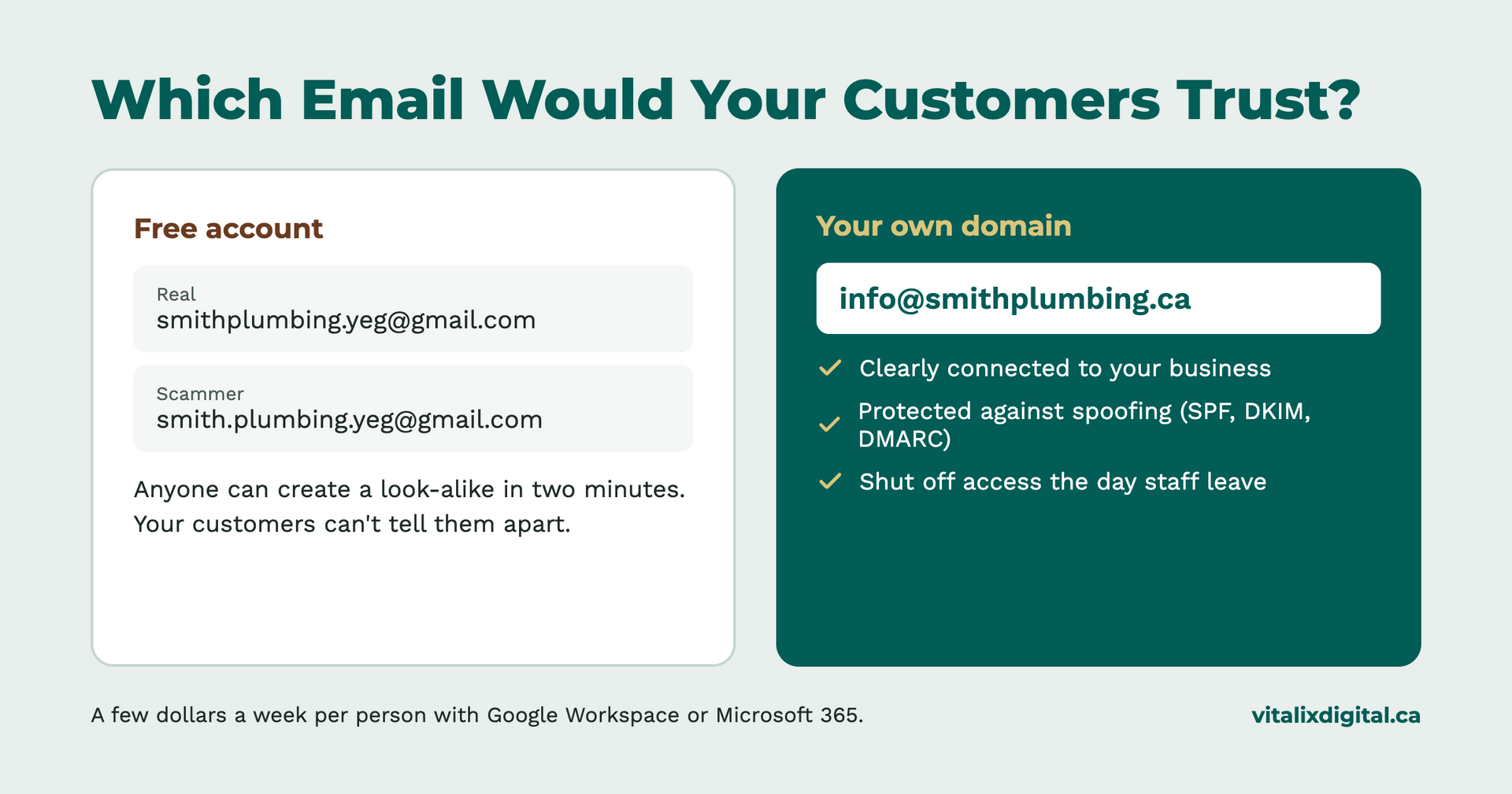
It's free and familiar, so a lot of businesses start with something like smithplumbing.yeg@gmail.com and never switch. The problem is that anyone can create a free account in two minutes. A scammer can sign up for smith.plumbing.yeg@gmail.com and email your customers asking them to pay a "new" account, and your customers have no easy way to tell the difference.
An email that matches your domain, like info@smithplumbing.ca, tells customers the message really came from your business. It's one of the small details we cover in branding that builds trust before the first call. It also lets you set up email authentication (SPF, DKIM and DMARC) so scammers can't easily fake your address. Business email through Google Workspace or Microsoft 365 usually costs a few dollars a week per person, and it comes with stronger security controls, admin tools and the ability to shut off access the day an employee leaves.
Letting a friend or family member "just set up" the website
A nephew who's good with computers can build a decent-looking site. But often the domain, hosting and admin logins end up in their personal accounts. Years later, the site breaks or the domain comes up for renewal, and nobody can get in. We've seen businesses lose their domain entirely this way.
Choosing the cheapest hosting with no maintenance
Budget hosting plans often skip automatic backups, security monitoring and software updates. A website that's never updated is like a storefront with a broken lock: it might be fine for a while, until it isn't. Not sure if yours is due for attention? See should you update your website?
Sharing one login across the whole team
One password for the email, the Facebook page and the online banking is easy to manage. It's also easy to steal, impossible to trace and stays active long after someone leaves. Each person should have their own login with only the access they need.
Running everything on personal devices
The business inbox on your personal phone, the bookkeeping on the family laptop, and a teenager downloading games on the same computer. Personal devices without passwords, updates or antivirus are an easy way in.
Working on public Wi-Fi without a VPN
Answering emails at the coffee shop, checking the bank account at the airport, sending invoices from a hotel lobby. Public Wi-Fi is convenient, but you don't know who set it up or who else is on it. Scammers sometimes create fake hotspots with names like "Free Coffee Shop WiFi" to watch what people do online.
A VPN (virtual private network) encrypts your connection, so others on the same network can't see what you're doing. A few things to know:
- Skip the free VPN apps. Many make their money by collecting and selling your data, which defeats the purpose. A reputable paid business VPN usually costs a few dollars a month.
- Your phone's hotspot is a great backup. It's usually safer than open public Wi-Fi when you need to log in to anything important.
- Avoid banking and payments on public Wi-Fi whenever you can, even with a VPN.
- Secure your own Wi-Fi too. Change the router's default password, and give customers a separate guest network so they're never on the same network as your POS system, computers or files.
A VPN isn't a cure-all. It won't stop you from clicking a phishing link. But for a business owner who works on the go, it closes one of the easiest doors to walk through.
Skipping backups and cyber insurance
Both feel optional until the day you need them. A recent backup can mean the difference between a bad afternoon and losing years of customer records. And many business insurance policies don't cover cyber fraud unless you've added it.
None of these fixes are expensive on their own. Together, they close the doors scammers walk through most often. It's far cheaper than cleaning up after a fraud.
Selling Online? Choose Where You Sell Carefully
An online shop can open your business to customers across the country. It can also open new doors for scammers if it isn't set up with care.
Stick with reputable platforms and payment processors
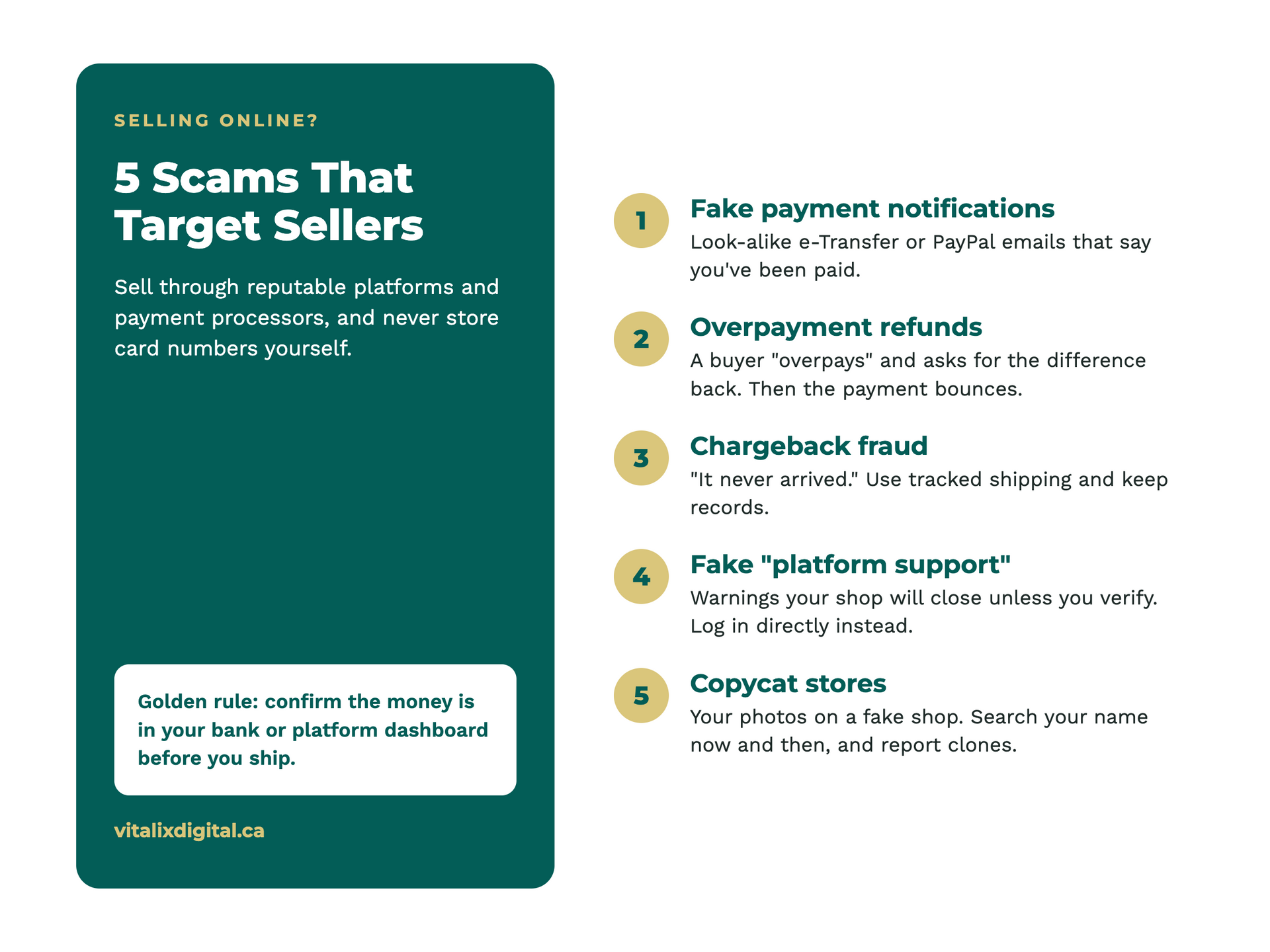
Established platforms like Shopify, Square, WooCommerce, Etsy and Amazon, paired with trusted payment processors like Stripe, PayPal, Square or Moneris, handle the hardest security work for you. They protect card data, follow payment security standards (PCI DSS) and offer fraud screening. Your business never has to store a customer's card number, which is exactly how it should be.
Be cautious of unknown shopping-cart plugins, "too good to be true" low-fee payment gateways, or custom checkouts that ask you to collect card details yourself. If something goes wrong there, the liability and the cleanup land on you.
Watch for scams that target sellers
- Fake payment notifications. A "buyer" sends an email that looks like an Interac e-Transfer or PayPal confirmation, hoping you'll ship before checking your actual account. Always confirm the money has landed in your bank or platform dashboard.
- Overpayment scams. A buyer "accidentally" pays too much and asks you to refund the difference. The original payment later bounces, and you're out the refund and the product.
- Chargeback fraud. Someone buys, receives the item, then claims it never arrived. Use tracked shipping and keep records.
- Fake "platform support" messages. Emails or DMs claiming your Shopify, Etsy or Facebook shop will be shut down unless you verify your account. Log in directly to the platform to check, never through the link.
- Copycat stores. Scammers sometimes copy a real shop's photos and product descriptions to set up fake storefronts. Search your business name now and then, and report clones to the platform.
Selling on Facebook Marketplace or Kijiji
These are great for local sales, but they're also where many payment scams start. Stick to in-person cash or confirmed e-transfers for local pickups, and be wary of buyers who want to move the conversation off the platform or insist on shipping and unusual payment methods.
Picture this: A local candle maker lists a bundle on Marketplace. A buyer from out of province says they'll send an e-transfer plus extra for a courier. An official-looking email arrives saying the payment is "on hold until the shipping tracking number is provided." The candles ship, the courier fee is paid, and the e-transfer never existed.
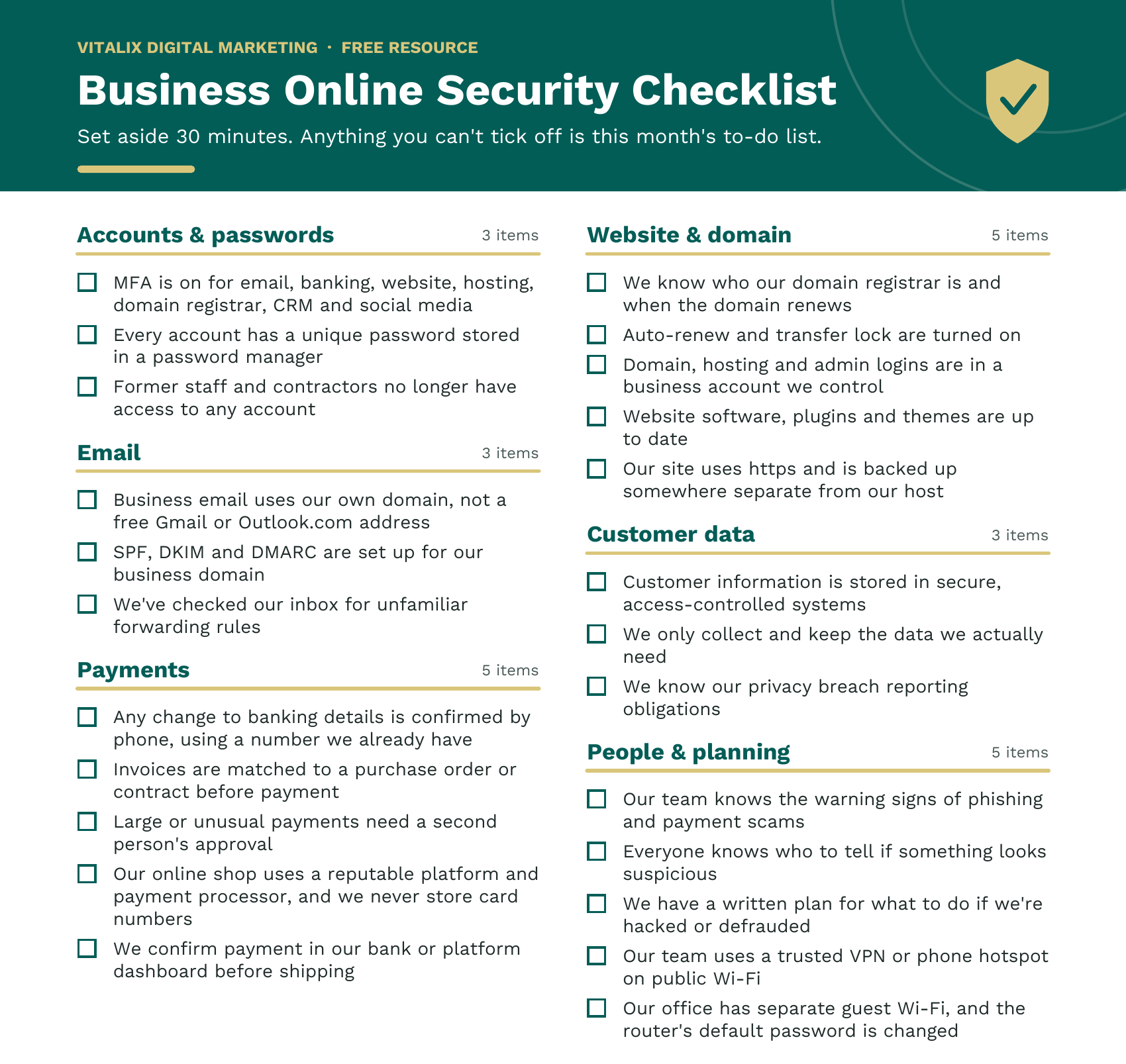
Your Business Online Security Checklist
Set aside 30 minutes and work through this list. Anything you can't tick off is your to-do list for the month.
What To Do If You Suspect Fraud (And Where to Report It)
Act fast. The first hour after a scam matters most, especially if money has moved.
Step 1: Stop the damage
- Call your bank or payment provider immediately if you sent money or shared card or banking details. They may be able to stop or reverse the transaction.
- Change passwords and turn on MFA for any account that may be compromised, starting with email.
- Disconnect infected devices from the internet if you opened a suspicious attachment.
- Warn your team and, if needed, your clients, so the scammer can't use your name to target them next.
Step 2: Gather the evidence
Save emails (including the full header if you can), screenshots, phone numbers, invoices, payment receipts and dates. Don't delete anything, even if it's embarrassing.
Step 3: Report it
| Situation | Where to report | URL |
|---|---|---|
| Any fraud, scam or cybercrime | Your local police, plus the Canadian Anti-Fraud Centre online or at 1-888-495-8501 | https://reportcyberandfraud.canada.ca |
| A cyber incident affecting your systems (hacking, ransomware, account takeover) | The Canadian Centre for Cyber Security through its My Cyber Portal | https://www.cyber.gc.ca/en/incident-management |
| Customer or employee personal information was exposed (Alberta) | Office of the Information and Privacy Commissioner of Alberta, if there’s a real risk of significant harm | https://oipc.ab.ca/breach-notification/ |
| A fake domain renewal or suspicious transfer | Your domain registrar right away; for .ca domains, CIRA can also help | https://www.cira.ca/en/domain-abuse/ |
| A hacked or impersonated social media account | The platform’s official help centre or business support | No single URL. Go to the help centre for Facebook, Instagram, LinkedIn or whichever platform it is. |
| Deceptive marketing or misleading business practices | The Competition Bureau of Canada | https://competition-bureau.canada.ca/en/contact-competition-bureau-canada/complaint-form |
The CAFC encourages reporting even when you didn't lose money. Every report helps police spot patterns and warn other businesses.
Step 4: Watch out for recovery scams
After a fraud, you may be contacted by someone promising to get your money back for a fee. This is another scam. The CAFC warns never to pay upfront to recover money lost to fraud.
Don't Let Fear Keep Your Business Offline
If all of this makes you want to unplug the router, we get it. But avoiding the internet doesn't make you safe. Scammers still call, text and email businesses that have no website at all. Meanwhile, you miss out on every customer who searches online before they buy.
The businesses that stay safe aren't the ones that avoid technology. They're the ones that set it up properly from day one.
Why professional setup matters
A lot of risk hides in small things that are easy to miss when you're doing it yourself at 11 p.m. after a long day:
- A domain registered under a former employee's personal email
- A website plugin that hasn't been updated in two years
- One Facebook password shared by five people
- Email anyone can spoof because DMARC was never set up
- A CRM where everyone has admin access to every customer record
A professional catches these gaps before a scammer does. When we build a website or set up a CRM at Vitalix, protections like multi-factor authentication, proper user permissions, domain locks, email authentication and backups are part of the build, not an afterthought. Curious what a properly set-up CRM looks like? Read is the Leads Toolkit CRM right for your business?
No setup makes you 100% scam-proof. People will always be the last line of defence. But a solid foundation means one rushed click is far less likely to turn into a disaster.
Frequently Asked Questions
What is the most common scam targeting small businesses? Phishing emails are the most common entry point. They often lead to account takeovers, fake invoices and fraudulent payment requests.
How can I tell if a domain renewal notice is real? Check who your domain is actually registered with. If the notice comes from a different company, or asks you to transfer or pay outside your registrar's account dashboard, ignore it and log in to your registrar directly.
Should I report a scam if I didn't lose any money? Yes. The Canadian Anti-Fraud Centre asks Canadians to report suspicious contact either way, because reports help warn other businesses.
What's the single most important step to protect my business online? Turn on multi-factor authentication for your email. Your inbox is the key to resetting almost every other account you own.
Is it safe to put my business online? Yes, when it's set up properly. Most attacks take advantage of simple gaps like missing MFA, outdated software or shared passwords. Closing those gaps removes much of the risk.
Need help locking down your online presence?
You've worked too hard building your business to lose it to one convincing email. At Vitalix Digital Marketing, we help Edmonton and Alberta businesses get online with confidence. Our websites, CRM and automation systems are built with security in mind from day one, so you can focus on your customers instead of worrying about what's lurking in your inbox.
Not sure where your business stands? Book a free consultation and we'll walk through your website, domain and accounts with you.
About the Author
Monica Habersack is the owner and Marketing Director of Vitalix Digital Marketing. With more than 15 years of experience in management, operations, and marketing, she helps business owners connect strategy, customer experience, digital marketing, and practical systems.
Sources
- Canadian Anti-Fraud Centre: Fraud Trends, First 6 Months of 2026
- Canadian Anti-Fraud Centre: Fraud Prevention Month 2026
- Canadian Centre for Cyber Security: Resources for small and medium organizations
- ITBusiness.ca: CIRA warns of fake .ca renewal notices
- Office of the Information and Privacy Commissioner of Alberta: PIPA breach notification decision example
- Calgary Police Service: Woman charged after email fraud
- RCMP: Charges laid in multi-million-dollar Nunavut fraud
- CTV News: London Drugs stores remain closed after cybersecurity incident
- Express & Star: M&S cyber attack set to cost £300m
- CFIB: Half of Canadian business owners have experienced fraud in the past year





































About Vitalix Digital
We help small and medium- sized businesses grow with strategic marketing, high performing websites, and lead generation systems that actually work.
Free Resources

Website Examples